
Model objects are created with the
graphical user interface or with the Python interface, by indicating the
location of the Model Database.
-
In the
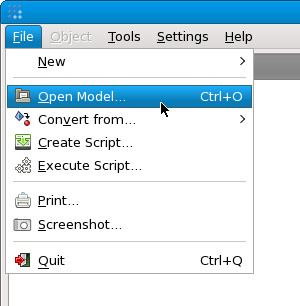
Modelsection of the main window, click the right mouse button to pop up the context menu. SelectOpen Model...: -
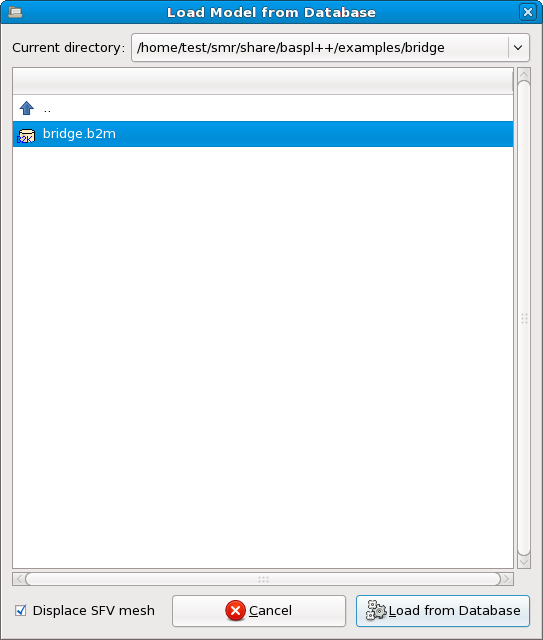
A dialog is then shown where you can browse through the directory hierarchy of your computer's file system(s) and select with a MemCom database:
To load the database into a new
Modelobject, click on the "Load from Database" button. TheModelobject is then selected and can be edited.
Below is an example that creates a new
Model object which is referenced by the
variable m and opens the MemCom database
airfoil.mc:
>>> m = Model('airfoil.mc')The Model constructor takes several
optional arguments. Type
>>> help(Model.__init__)
to obtain the online reference for the
Model constructor. In the following, we give a
number of examples how these arguments are used:
-
For databases containing multiple meshes and/or coordinate sets, one may not know beforehand what mesh or coordinate set to select. Since browsing the available enumerator values with baspl++ is only possible once the
Modelobject has been created, there is theexact_matchargument can be used to select the first nearly-matching mesh and coordinate set.m = Model('opt.mc', exact_match=False)This will load the first valid mesh present on the database. For the Python interface, the
exact_matchargument is by default set toFalse. However, when creatingModelobjects with the graphical user interface or from command-line arguments, this argument is implicitly set toTrue. -
A database containing the results of a genetic optimization process consists of many meshes, which are identified by the (generation,variant,discipline) enumerators. The generation enumerator specifies the generation identifier, the variant specifies which variant of the given generation, and the discipline enumerator specifies what discipline ('CFD', 'CSM').
To each variant, using the results from the different disciplines, a goal function is applied. The variants with the lowest goal function value is considered the best variant.
m = Model('opt.mc', generation=41, variant='best', discipline='CSM') -
For nonlinear analyses with mesh adaption, the mesh connectivity may change at each computational cycle. Hence, for each of these cycles, the mesh connectivity is stored on database, and the mesh must be selected when creating the
Modelobject. This is achieved using themeshcycleargument.m = Model('adaptation.mc', meshcycle=4) -
For some aero-elastic analyses, several coordinate sets for the same connectivities may be stored on the database. The coordinate set is chosen using the
coorcycleargument:m = Model('ae.mc', coorcycle=2) -
For structured Finite Volume (SFV) meshes, as are used by block-structured CFD codes, the
Modelobject can be created displaced or not. This is steered with thedisplace_sfvargument which isTrueby default.In undeformed SFV meshes, field values are defined at cell centres and are considered constant over each cell. In displaced meshes, the nodal coordinates are re-located to coincide with centres of the cells and of the ghost cells; this allows for smooth interpolation of field values and rendering of colours. But on the other hand, displacement fields from aero-elastic simulations can only be displayed on undeformed meshes. So for these meshes, the
Modelobject can be created as follows:m = Model('ae.mc', displace_sfv=False) -
All these arguments may be used in combination. Example:
m = Model('ae.mc', coorcycle=2, exact_match=False, displace_sfv=False)
The operations performed when a Model
object is created are the following:
-
Open the MemCom database.
-
Python interface: From the database, select the mesh and coordinates according to the supplied arguments. Graphical user interface or
exact_matchargument set toFalse: Select the first mesh from the database. -
Load the coordinates and transform them to the global coordinate system
-
Load the element parameters.
-
For unstructured meshes, load the element connectivities.
