1. B2000++ Data Browser (gtk version)
b2browser is a GUI based program for examining the content of one or more B2000++ model databases and for displaying log files of B2000++ runs associated to a database. If no model database is specified on the command line, model databases can be opened with the FILE menu.
The b2browser list meshes (nodes, elements, node and element lists), materials. boundary conditions, case information, solutions found, as well as other data. In addition, the B2000++ Log file can be displayed during run time or a posteriori.
b2browser formats database information in a comprehensible way for the user. To read a B2000++ database in a raw way, i.e. dataset by dataset, without any interpretation, please make use of the b2mcbrowser application.
Synopsis
b2browser.py [-h] [--version] [--verbose] [--debug] DBNAMES

positional arguments:
  DBNAMES     B2000++ model database name

optional arguments:
  -h, --help  show this help message and exit
  --version   Print version and stop.
  --verbose   Verbose output (test).
  --debug     Debug mode, prints traceback and optional app dependent
              printout.
If no model database is specified on the command line, model databases can be opened with the FILE menu.
Files
The b2browser creates or updates the preferences file under
$HOME/.config/B2000++/b2browser.json.
Example Session
Start the b2browser from the shell with virtual environment activated ( The database is taken from the scordelis_lo_roof example case):
b2browser scordelis_lo_roof.b2m
Start the b2browser from the shell without virtual environment activated ( The database is taken from the scordelis_lo_roof example case). Requires specification of the path to the installation prefix:
<prefix>/bin/b2browser scordelis_lo_roof.b2m
The following b2browser keys for extracting and displaying of data are active during a session:
Left Mouse Key: Selects an entry and displays text.
<shift> Left Mouse Key: Selects an entry and displays a graph (if applicable [1] and graphics software installed). Not active in this version.
<ctrl> Left Mouse Key: Selects an entry and exports data in a CSV (comma separated value) file (if applicable ). Not active in this version.
The b2browser is GUI based and its operation is mostly self-explanatory. When starting the b2browser with a B2000++ database the main page pops up:
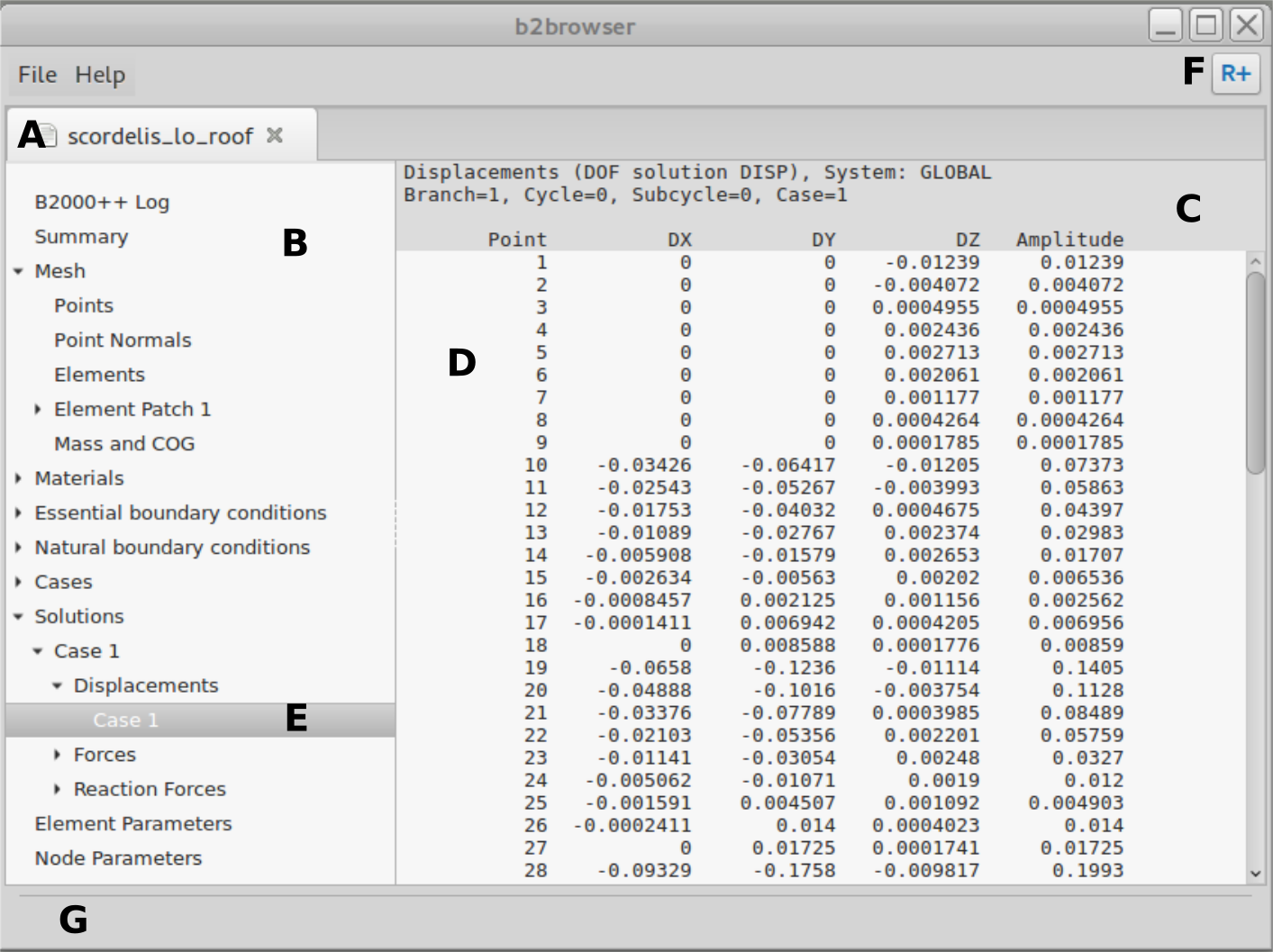
All entries are selected by clicking the left mouse button.
The top row of the main page contains the File and Help menus, as well as additional global menus and buttons. The File menu allows for opening B2000++ databases and the report file.
The actual browser area contains tabs (A), each tab holding a B2000++ database. A list with all elements that can be browsed is presented in B and the content of an element is presented in C and D, C being the ‘column header’. Finally, G displays messages.
The list with all elements that can be browsed (B) starts with the B2000++ Log entry, which displays the B2000++ log file (if available). All other entries pertain to the B2000++ model. If an entry is preceded by the > symbol, clicking on > will unfold the entry. In the example above, the displacements of Case 1 are selected and displayed (E).
Preferences can be set with the Preferences entry of the File Menu. Bugged in this version, sorry.