4. FE Model Converter Tests
These tests check the converting tools that allow for a conversion from other FE inputs to the MDL format used by b2000.
Some points on setting up converter tests:
Ideally the conversion should produce a suitable simulation result (ideally in comparison to some analytic solution, but it may also be some reference from the other FE program for which the conversion is done, if there is no analytical solution) With such a test the complete pipeline is checked and it is ensured that converter and b2000 behave as expected.
If that is not possible or not desired, the produced MDL output should be accepted by b2ip++. Such a test ensures that the converter at least produces a valid MDL file that can be parsed by the input processor.
In some cases there may be inputs that can only be partially converted currently and the resulting MDL requires some further manual alteration. For a meaningful check on that it probably would be good to emulate that manual alteration for setup and run the resulting valid MDL.
4.1. BDF Converter tests
These tests check on the Nastran converter to produce correct MDL inputs out of BDF files.
4.1.1. Airjet Half Model (BDF)
Note
Location of verification case:
verification/converters/bdf_airjet
A Nastran Bulk Data Format (BDF) file is converted to a B2000 MDL input file, which is then processed with the input processor. No values are checked.
Run the conversion test with the shell commands:
prompt> tar xf aircraft.bdf.tar.xz
prompt> b2convert_from_nas -verbose aircraft.bdf aircraft.mdl

Length          is scaled by 1
Mass            is scaled by 1
Force           is scaled by 1
Moment          is scaled by 1
Gravity         is scaled by 1
Elastic modulus is scaled by 1
Stiffness       is scaled by 1
Density         is scaled by 1
Beam property stabilization  1e-06
opening BDF file and reading statements... done.
parsing executive statement section... done.
parsing case control section... done.
parsing bulk data deck entries... done.
processing bulk data deck entries... done.
writing messages for unknown entries... done.
checking load cases... done.
processing EMAT entries... done.
processing EBC entries... done.
processing NBC entries... done.
writing B2000++ entries to MDL file... done.
and create the FE database:
prompt> b2ip++ aircraft.mdl
The model database aircraft.b2m viewed with baspl++:
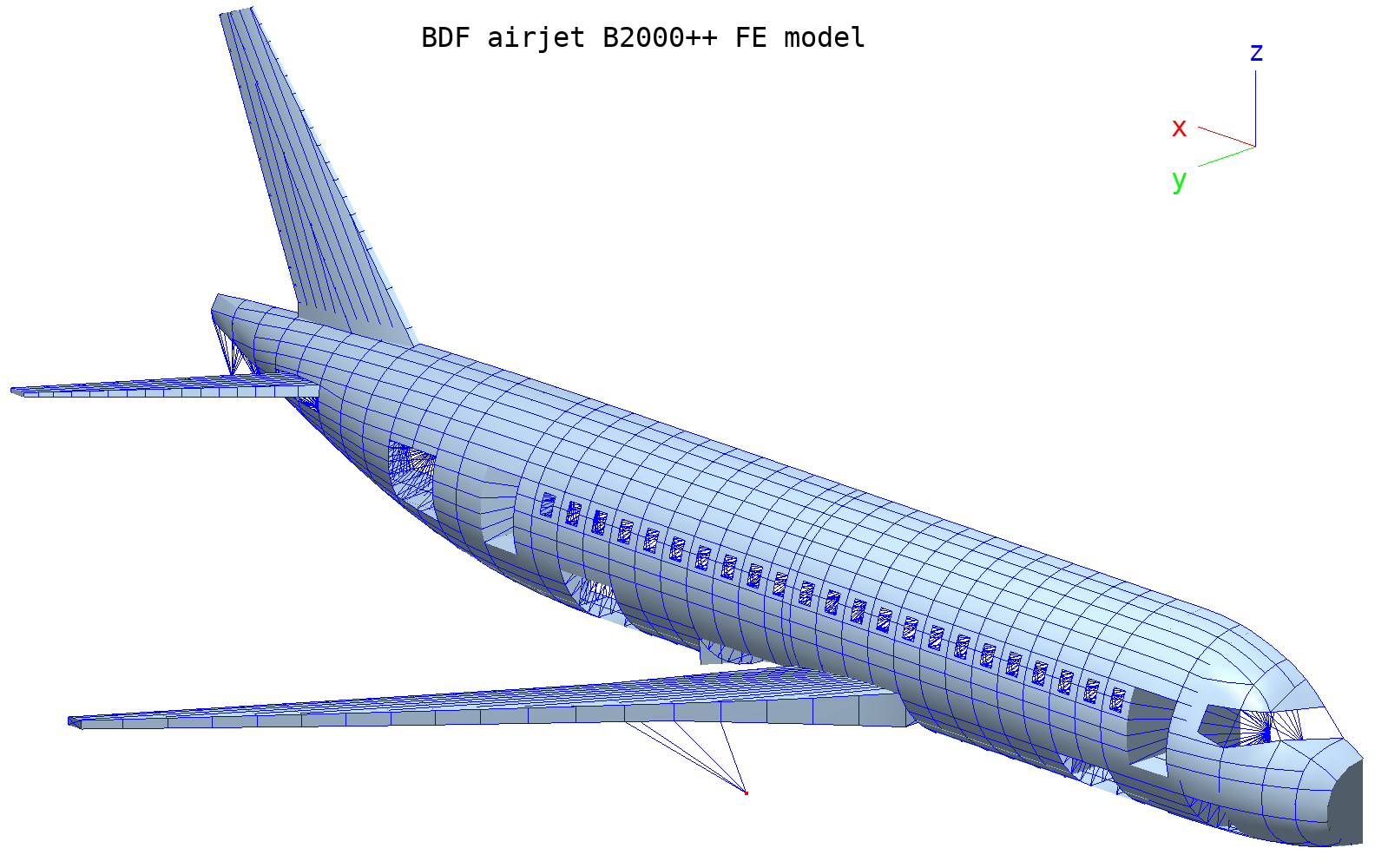
Model geometry converted to B2000++.
4.1.2. Truss (BDF)
Note
Location of verification case:
verification/converters/bdf/truss
This published basic NASTRAN test consist of a simple 2-dimensional truss made of rod elements. The structure is simply supported at nodes 1 and 7. Forces Fx=-1500 and Fy=-1300 are applied on nodes 2, 4, 6. Displacements, reaction forces and stresses are computed.
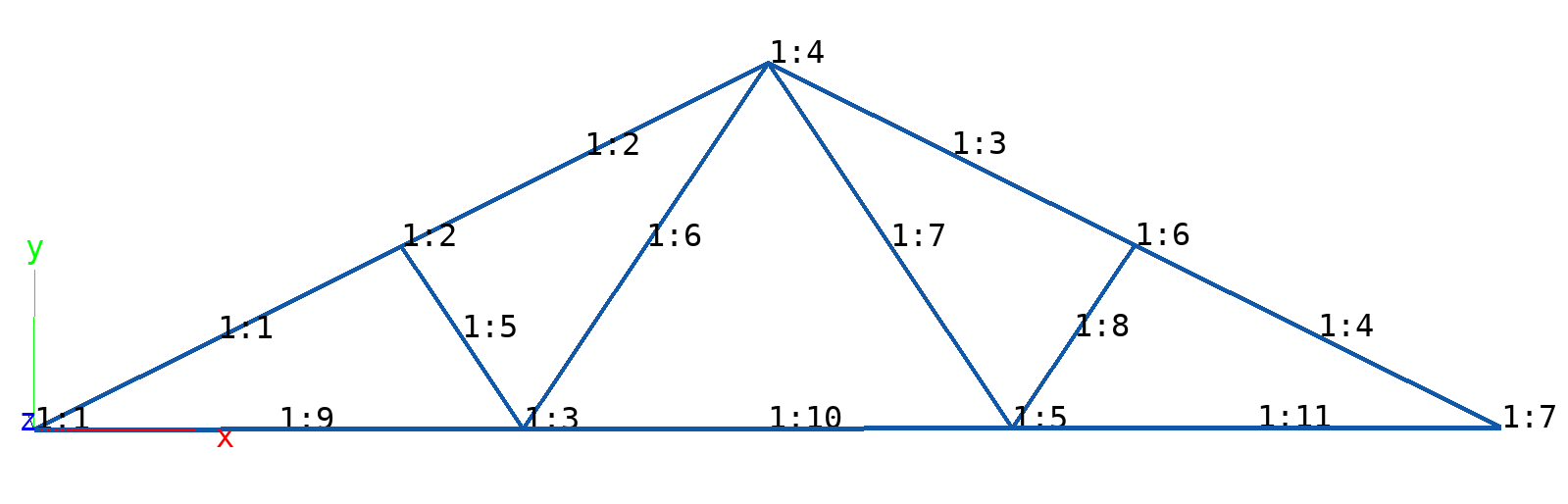
Truss: Mesh with node and element numbering. Note that the prefix
1: means “branch one”.
The BDF input file truss.bdf is listed below:
SUBCASE 1
   SUBTITLE=TRUSS_LBCS
   SPC = 2
   LOAD = 2
   DISPLACEMENT = ALL
   SPCFORCES = ALL
   STRESS = ALL
BEGIN BULK
PROD     1       1       5.25
CROD     1       1       1       2
CROD     2       1       2       4
CROD     3       1       4       6
CROD     4       1       6       7
CROD     5       1       2       3
CROD     6       1       3       4
CROD     7       1       4       5
CROD     8       1       5       6
CROD     9       1       1       3
CROD     10      1       3       5
CROD     11      1       5       7

MAT1     1       1.76+6                                                 +      A
A+      A 1900.   1900.

GRID     1               0.      0.      0.             3456
GRID     2               144.    72.     0.             3456
GRID     3               192.    0.      0.             3456
GRID     4               288.    144.    0.             3456
GRID     5               384.    0.      0.             3456
GRID     6               432.    72.     0.             3456
GRID     7               576.    0.      0.             3456

SPCADD   2       1       3
LOAD     2       1.      1.      1       1.      3
SPC1     1       12      1
SPC1     3       2       7
FORCE    1       2       0       1500.   0.     -1.      0.
FORCE    1       4       0       1500.   0.     -1.      0.
FORCE    1       6       0       1500.   0.     -1.      0.
FORCE    3       2       0       1300.  -1.      0.      0.
FORCE    3       4       0       1300.  -1.      0.      0.
FORCE    3       6       0       1300.  -1.      0.      0.
ENDDAT
The first step consist in converting the BDF file
truss.bdf to a MDL file truss.mdl by means of
the b2convert_from_nas converter. Lauch from the shell:
prompt> b2convert_from_nas -verbose truss.bdf truss.mdl

Length          is scaled by 1
Mass            is scaled by 1
Force           is scaled by 1
Moment          is scaled by 1
Gravity         is scaled by 1
Elastic modulus is scaled by 1
Stiffness       is scaled by 1
Density         is scaled by 1
Beam property stabilization  1e-06
opening BDF file and reading statements... done.
parsing executive statement section... done.
parsing case control section... done.
parsing bulk data deck entries... done.
processing bulk data deck entries... done.
writing messages for unknown entries... done.
checking load cases... done.
processing EMAT entries... done.
processing EBC entries... done.
processing NBC entries... done.
writing B2000++ entries to MDL file... done.
b2convert_from_nas -verbose truss.bdf a.mdl

# b2convert_from_nas truss.bdf a.mdl
#
# Messages generated during processing of Nastran bulk data deck entries:
#
# The following bulk data deck entries are not supported:
#   enddat
# The following case control statements are not supported:
#   displacement
#   spcforces
#   stress
# grid: PS is not supported.
#   nid=1 ps=3456
#   nid=2 ps=3456
#   nid=3 ps=3456
#   nid=4 ps=3456
#   nid=5 ps=3456
#   nid=6 ps=3456
#   nid=7 ps=3456
# mat1: Property NU is not defined.
#   mid=1
#

nodes
  1  0  0  0
  2  144  72  0
  3  192  0  0
  4  288  144  0
  5  384  0  0
  6  432  72  0
  7  576  0  0
end

elements
  type R2.S
  mid 1
  area 5.25
   1       1      2
   2       2      4
   3       4      6
   4       6      7
   5       2      3
   6       3      4
   7       4      5
   8       5      6
   9       1      3
  10       3      5
  11       5      7
end

material 1  type isotropic
  e 1760000.
  nu 0.
end

ebc 1
  dof 1
  value 0 node 1
  dof 2
  value 0 node 1
end

ebc 2
  dof 1
  value 0 node 1
  dof 2
  value 0 node 1
  value 0 node 7
end

ebc 3
  dof 2
  value 0 node 7
end


nbc 1
  dof 2
  value -1500 node 2
  value -1500 node 4
  value -1500 node 6
end

nbc 3
  dof 1
  value -1300 node 2
  value -1300 node 4
  value -1300 node 6
end

case 1
  ebc 2
  nbc 1
  nbc 3
  analysis linear
  autospc yes
  gradients 1
end

adir
  cases 1
end
The problem is solved with B2000++ from the shell with the command:
prompt> b2000++ truss.mdl

INFO:solver.static_linear:21:53:20.056: Start static linear solver
INFO:solver:21:53:20.056: Resolving linear constraints: 3 equations.
INFO:solver:21:53:20.056: 0 dependent constraints were eliminated.
INFO:solver:21:53:20.056: Reduction matrix (18 x 21) has 18 nonzeros.
INFO:solver.static_linear:21:53:20.056: Assemble the natural boundary conditions
INFO:solver.static_linear:21:53:20.056: Element matrix assembly
INFO:solver.static_linear:21:53:20.056: Resolve the linear problem
INFO:solver.static_linear:21:53:20.057: Compute gradients and reaction forces
INFO:solver.static_linear:21:53:20.057: End of static linear solver
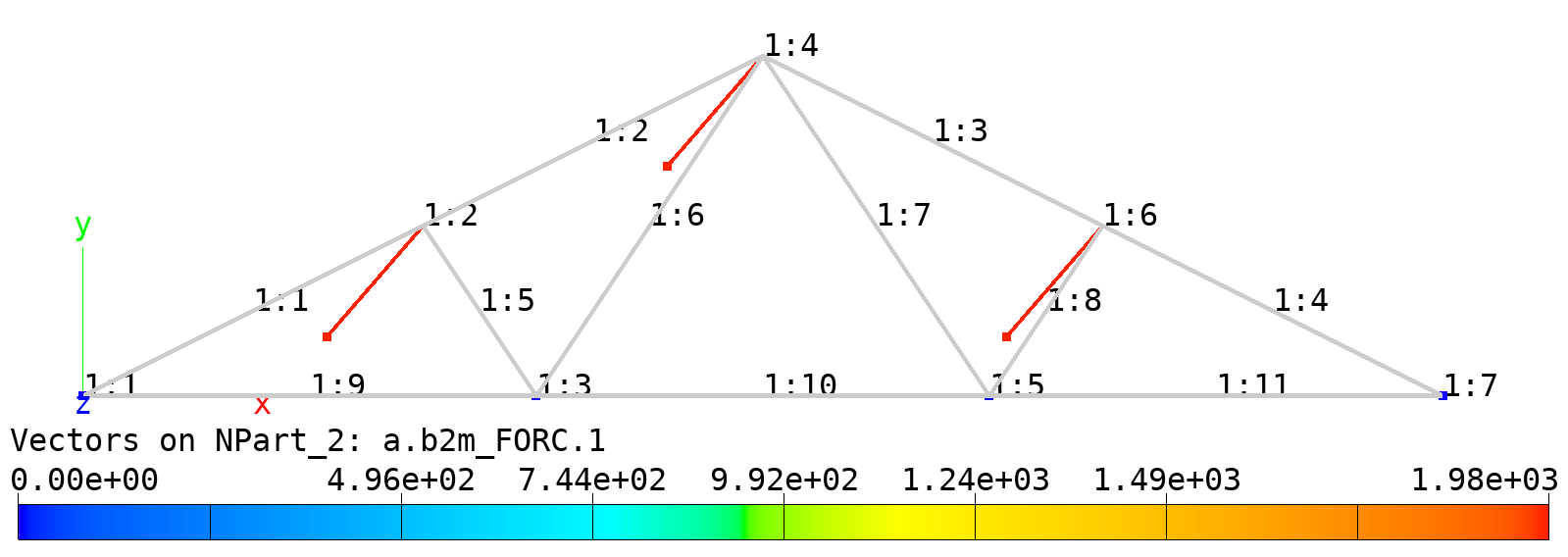
Truss: Mesh and applied forces (nbc). Forces Fx=-1500 and Fy=-1300 applied on nodes 2, 4, 6.
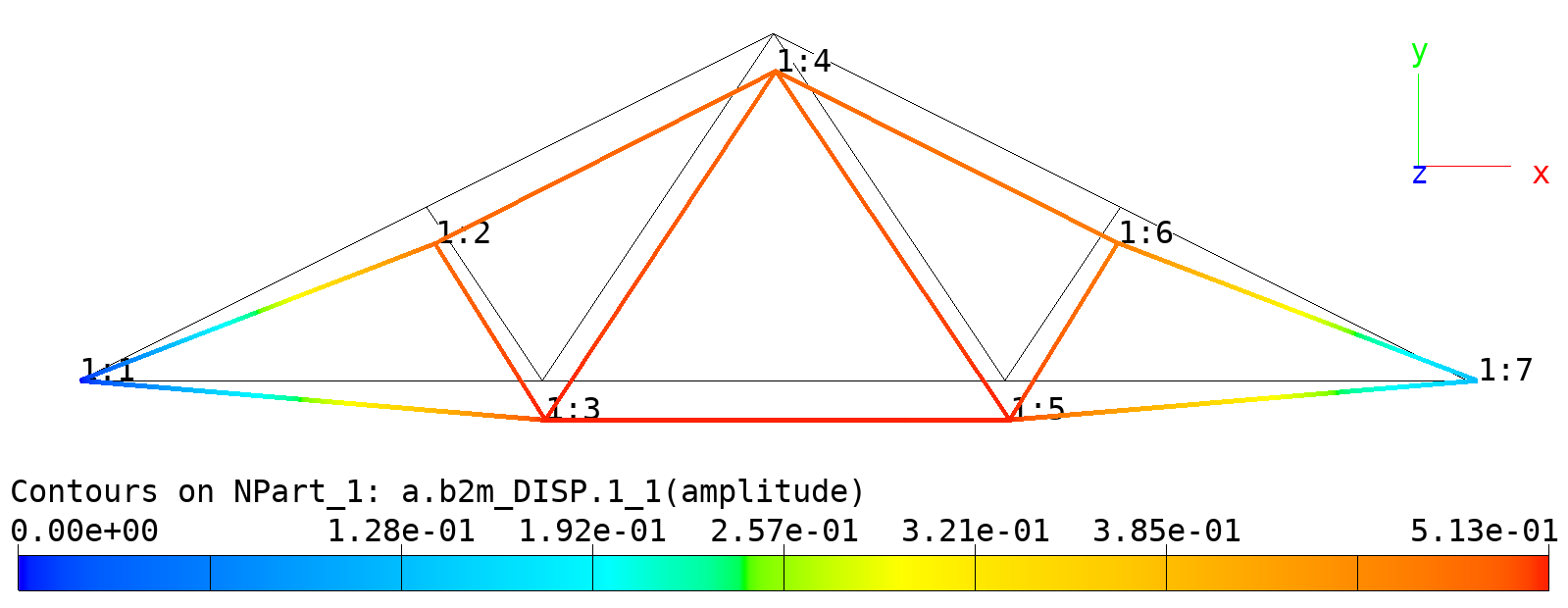
Truss: Deformed and undeformed mesh. Amplification factor: 32.
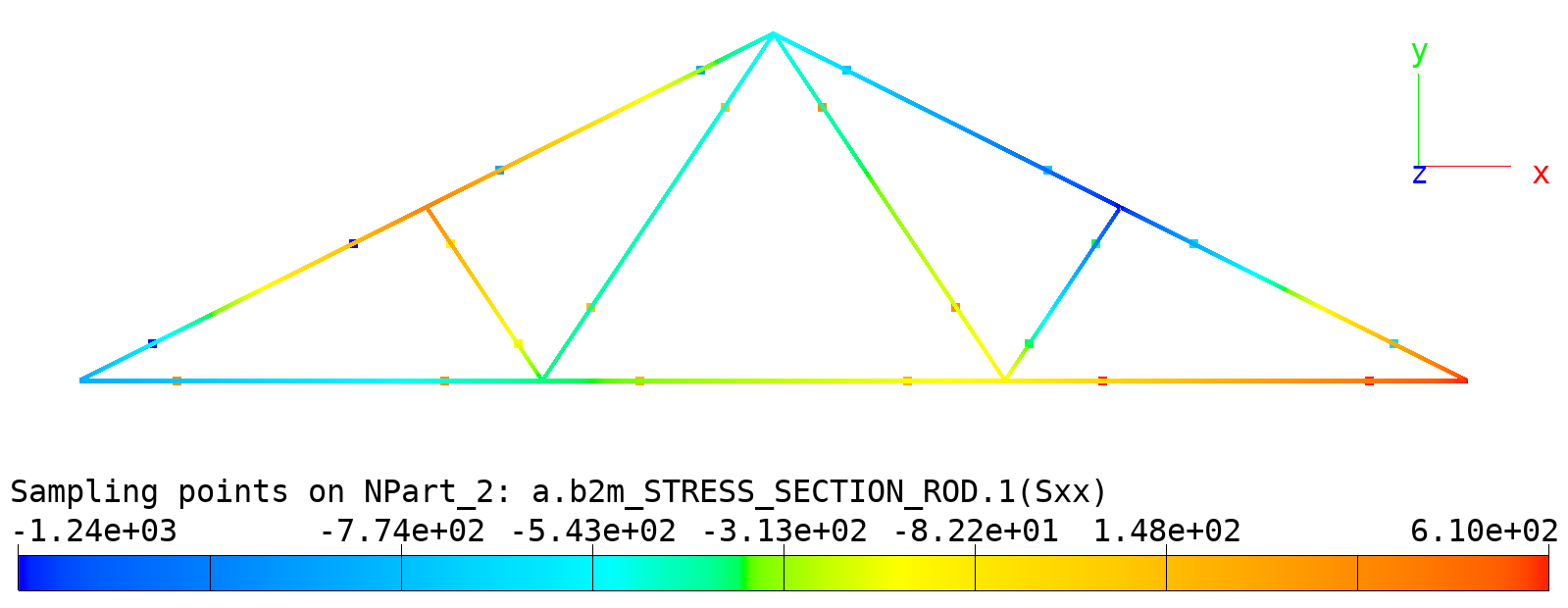
Truss: Stresses in rods. Dots: Stresses in rods.
Node displacements output from b2browser:
Displacements and Rotations (DISP), case=1, cycle=0, subcycle=0

         EID *      DX           DY           DZ       Amplitude
           1 G           0            0            0            0
           2 G      0.1103      -0.4732            0       0.4858
           3 G     0.03948      -0.5117            0       0.5132
           4 G      0.0285      -0.4872            0        0.488
           5 G      0.0613      -0.5089            0       0.5126
           6 G    -0.03559      -0.4661            0       0.4675
           7 G      0.1278            0            0       0.1278

Largest amplitude=0.513246
External forces (nbc conditions) output from b2browser:
Node Forces and Moments (FORC),  case=1, cycle=0, subcycle=0

         EID *      FX           FY           FZ       Amplitude
           2 G       -1300        -1500            0         1985
           4 G       -1300        -1500            0         1985
           6 G       -1300        -1500            0         1985
Reaction forces and moments output from b2browser:
Reaction forces and moments (RCFO), case=1, cycle=0, subcycle=0

         EID *      FX           FY           FZ       Amplitude
           1 G        3900         2900            0         4860
           7 G  -9.095e-13         1600            0         1600
Stress output from b2browser (selected elements listed only). One point per element listed (R2 elements exhibit constant stress):
Sample field STRESS_SECTION_ROD (Rod section stresses,ranch=1, Case=1, Cycle=0

   Element Point     Sxx
         1     1        -1235
         2     1       -867.8
         3     1       -729.4
         4     2       -681.5
         5     1       -145.9
         6     2        145.9
         7     2        369.1
         8     2       -369.1
         9     2        361.9
        10     2          200
        11     2        609.5
4.1.3. Small setup to check scale factors for NBCs (BDF)
Note
Location of verification case:
verification/converters/bdf/scaled
This test consists of a set of CQUAD4 shell elements in a simple setup with an overall scale factor. The BDF input file is converted into an MDL and the MDL is run through b2000++ with the resulting displacements being checked upon to match up with the expected scaled loads.
4.1.4. Cantilever of CTRIA6 elements (BDF)
Note
Location of verification case:
verification/converters/bdf/ctria6
This test consists of a set of CTRIA6 shell elements in a cantilever setup. The BDF input file is converted into an MDL and the MDL is run through the b2ip++ input processor. Some sanity checks on the resulting model are performed, but no simulation is run.
4.1.5. Conversion of SET3 cards to nodeset / elementset
Note
Location of verification case:
verification/converters/bdf/sets
The test checks that Nastran SET3 cards are correctly
converted to B2000++ nodeset and elementset entries
using a simple truss model as a base. It covers GRID and
ELEM sets (incl. THRU option) and verifies that the
B2000++ model contains sets with the expected node/element
IDs after running b2convert_from_nas and b2ip++. It also tests that
b2convert_from_nas / b2ip++ abort on bad inputs like invalid THRU
positions, non-ascending ranges, duplicate set IDs, or
references to non-existing nodes/elements.
4.1.6. Beam section shapes (PBEAML, PBARL)
Note
Location of verification case:
verification/converters/bdf/beam_sections
Two Nastran models (Bulk Data Files) containing PBEAML (first model)
and PBARL properties (second model) are converted to MDL using b2convert_from_nas.
The resulting B2000++ model is run through b2ip++ and the computed section
constants of the converted beam section properties are compared to reference
values (Nastran) from a CSV file.
The Nastran model pbarl.bdf contains 75 different properties of
shapes BAR, BOX, CHAN, CHAN1, CHAN2, H, I,
I1, ROD, T, T1, T2, TUBE, TUBE2 and Z. The
second Nastran model pbeaml.bdf contains 80 properties of the
aforementioned shapes, and additionally the L shape.
To create the reference data (CSV file) for the system test, the Nastran model is processed with Nastran 2023.4 and the section constants are read from the HDF5 result database and exported to a CSV file with the following Python function:
import h5py
import pathlib
import csv
from typing import Literal


def nastran_section_constants_to_csv(
    nastran_result_database: pathlib.Path,
    output_csv_filepath: pathlib.Path,
    mode: Literal["BAR", "BEAM"] = "BEAM",
) -> None:
    """
    Read PBEAML / PBARL entries from HDF5 file and extract
    computed section constants (PBEAM / PBAR) to CSV file.

    :param nastran_result_database: Filepath of Nastran HDF5 results database.
    :param output_csv_filepath: Filepath of CSV file to write section constants to.
    :param mode: One of "BAR" (extract PBARL section constants) or "BEAM" (extract
       PBEAML section constants).
    """
    with h5py.File(nastran_result_database.with_suffix(".h5"), "r") as db:
        # extract beam section shape names for each PID
        pid_to_shape_map = {}
        for row in db["NASTRAN"]["INPUT"]["PROPERTY"][f"P{mode}L"]["IDENTITY"]:
            pid_to_shape_map[int(row["PID"])] = row["TYPE"].decode("UTF-8").strip()
        # extract beam section constants for each PID
        section_data = []
        if mode == "BEAM":
            for pbeam in db["NASTRAN"]["INPUT"]["PROPERTY"]["PBEAM"]:
                section_data.append(
                    {
                        "PID": pbeam["PID"],
                        "SHAPE": pid_to_shape_map[pbeam["PID"]],
                        "A": pbeam["A"][0],
                        "I1": pbeam["I1"][0],
                        "I2": pbeam["I2"][0],
                        "I12": pbeam["I12"][0],
                        "J": pbeam["J"][0],
                        "C1": pbeam["C1"][0],
                        "C2": pbeam["C2"][0],
                        "D1": pbeam["D1"][0],
                        "D2": pbeam["D2"][0],
                        "E1": pbeam["E1"][0],
                        "E2": pbeam["E2"][0],
                        "F1": pbeam["F1"][0],
                        "F2": pbeam["F2"][0],
                        "K1": pbeam["K1"],
                        "K2": pbeam["K2"],
                        "N1A": pbeam["N1A"],
                        "N2A": pbeam["N2A"],
                    }
                )
        if mode == "BAR":
            for pbeam in db["NASTRAN"]["INPUT"]["PROPERTY"]["PBAR"]:
                section_data.append(
                    {
                        "PID": pbeam["PID"],
                        "SHAPE": pid_to_shape_map[pbeam["PID"]],
                        "A": pbeam["A"],
                        "I1": pbeam["I1"],
                        "I2": pbeam["I2"],
                        "I12": pbeam["I12"],
                        "J": pbeam["J"],
                        "C1": pbeam["C1"],
                        "C2": pbeam["C2"],
                        "D1": pbeam["D1"],
                        "D2": pbeam["D2"],
                        "E1": pbeam["E1"],
                        "E2": pbeam["E2"],
                        "F1": pbeam["F1"],
                        "F2": pbeam["F2"],
                        "K1": pbeam["K1"],
                        "K2": pbeam["K2"],
                    }
                )

    with open(output_csv_filepath.with_suffix(".csv"), "w", newline="") as csvfile:
        writer = csv.DictWriter(csvfile, fieldnames=section_data[0].keys())
        writer.writeheader()
        writer.writerows(section_data)
4.1.7. Handling of duplicate element IDs
Note
Location of verification case:
verification/converters/bdf/colliding_element_ids
In Nastran decks, the same element identifiers (EIDs) might be used for multiple elements, but B2000++ only allows strictly unique element IDs.
The converter should detect those cases and provide a
handling strategy. An example BDF with colliding EIDs is
tested as input for the converter, while setting the
-eid-collisions STRATEGY to all three available options
(+ default):
b2convert_from_nas colliding_element_ids.bdf colliding_element_ids.bdf # default: abort
b2convert_from_nas -eid-collisions abort colliding_element_ids.bdf colliding_element_ids.bdf
b2convert_from_nas -eid-collisions drop colliding_element_ids.bdf colliding_element_ids.bdf
b2convert_from_nas -eid-collisions remap colliding_element_ids.bdf colliding_element_ids.bdf
The system test checks if the converter aborts by default or
if -eid-collisions abort is specified. For options
-eid-collisions drop and -eid-collisions remap it
checks whether the element count in the resulting model
matches the expected amount.